


Files attached to agent conversations inside Multica were reachable by anyone with the URL. Agents quote links in replies. Team members paste threads into Slack. Across a busy team that’s a slow, steady leak of sensitive files — customer screenshots, meeting transcripts, design mocks — into whatever tools those URLs end up pasted into. We moved the storage behind a private Cloudflare R2 bucket served through an authenticated Worker — and submitted a one-line upstream fix for the Multica bug that was forcing the public-bucket workaround. Here’s what we did.
Why can’t agent file attachments sit in a public bucket?
Because agents treat attachment URLs as data. Unlike a human user who opens a link once and moves on, an agent quotes the URL in its next reply, logs it in a thread summary, passes it to a downstream tool, and sometimes posts it to another channel. Every one of those paths is a chance for an individual file’s URL to escape its intended audience.
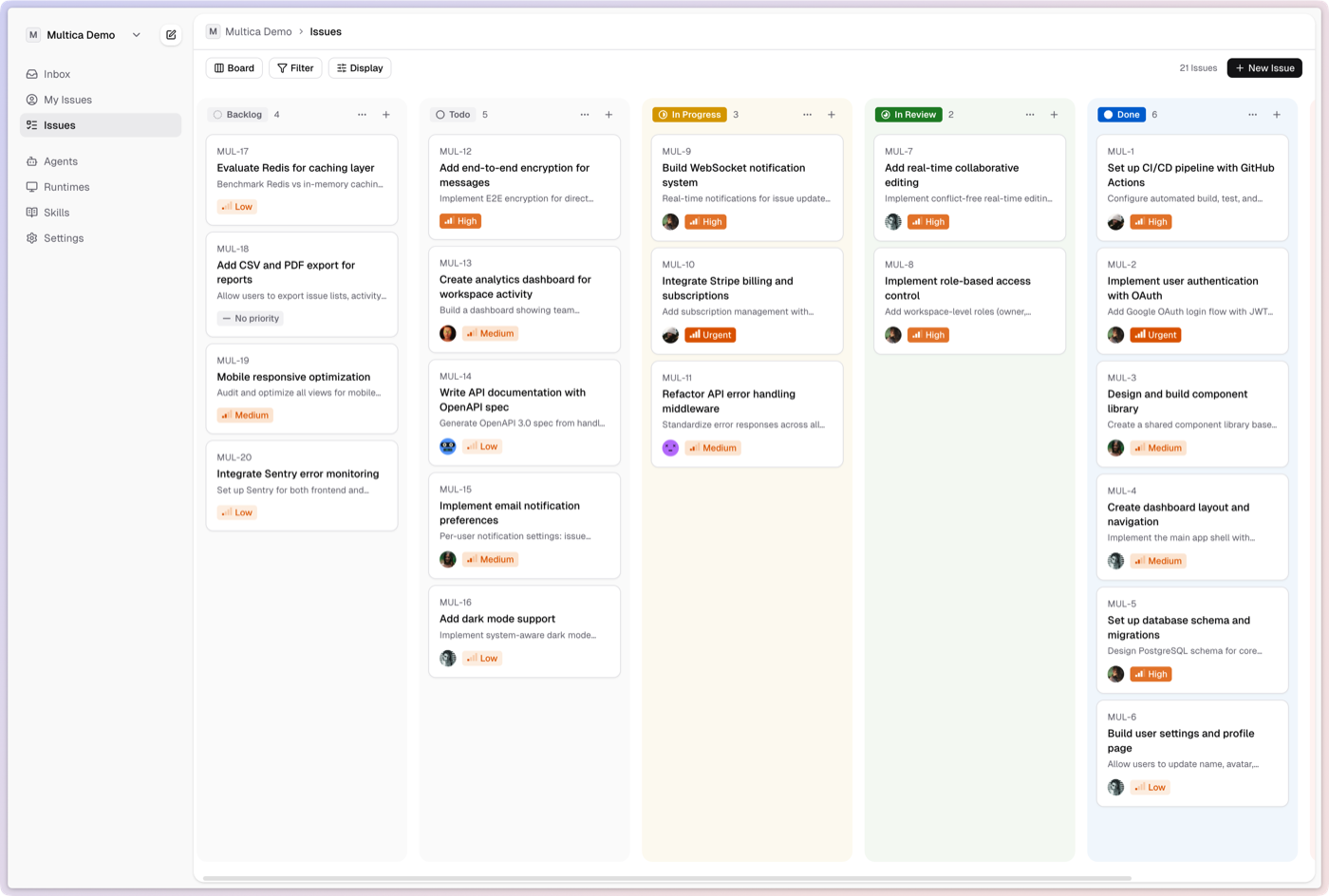
We run Multica as our team’s coordination layer, and agents post files into shared threads constantly. Multica writes those files into object storage and returns a URL — if the bucket is public, anyone who ends up with that URL can read that file. Agents echo URLs in replies. Team members copy threads into Slack or email. No single leak is catastrophic, but across a busy team they add up, and the only way to stop them is to require authentication on every read.
Which agents do we run inside Multica?
Our time as a company goes to three things — R&D, marketing, and operations — and we run a different mix of agents for each.
For R&D, three coding agents handle the software work — running locally on our machines: Codex on dev reviews, Claude Code on dev planning and execution, Gemini CLI on multimodal research (YouTube, images, long-context docs).
For marketing and operations — creative production, back-office work, brand deals — we run our own custom harness, what we call our creator computer. It travels with us, so we can act the moment inspiration strikes or an issue arises — rarely at a desk.
Multica treats harnesses as first-class. We self-host for security, customization, and the ability to run that custom harness — the managed cloud would have forced us to compromise on at least one.
How do you serve private Cloudflare R2 attachments with authentication?
Put a private R2 bucket behind a Cloudflare Worker that validates Multica-issued signed URLs or cookies. The bucket has no public domain and no public r2.dev URL. The Worker is the only read path. It reads the signed credentials, verifies them against Multica’s signing key, and streams the object directly from R2 to the client. The bucket stays private. The URL is authenticated. No public bytes without credentials.
That’s the same pattern Slack, Notion, and GitHub use for attachments: a public-facing authenticated endpoint in front of fully-private object storage.
Here’s how the trust boundaries stack:
| Layer | Public access | Gate |
|---|---|---|
| Multica UI | Gated | Cloudflare Access + Multica JWT |
| Multica API | Publicly reachable | Multica JWT |
| File-serving Worker | Publicly reachable | Multica-signed cookies or URLs (validated against our RSA public key) |
| R2 bucket | Fully private | Worker is the only read path |
We call this the Worker R2 Auth Proxy pattern — a Cloudflare Worker acting as an authenticated proxy in front of a private R2 bucket. The full request flow:
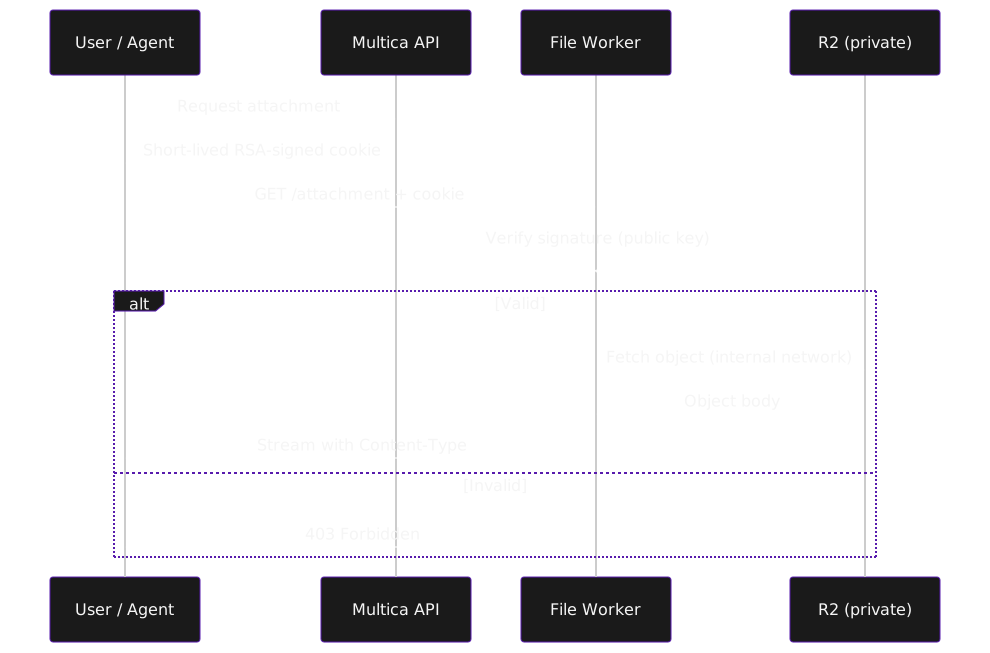
Diagram source (mermaid)
sequenceDiagram
    participant User as User / Agent
    participant API as Multica API
    participant Worker as File Worker
    participant R2 as R2 (private)

    User->>API: Request attachment
    API-->>User: Short-lived RSA-signed cookie
    User->>Worker: GET /attachment + cookie
    Worker->>Worker: Verify signature (public key)
    alt Valid
        Worker->>R2: Fetch object (internal network)
        R2-->>Worker: Object body
        Worker-->>User: Stream with Content-Type
    else Invalid
        Worker-->>User: 403 Forbidden
end- A user or agent requests an attachment URL from the Multica API
- Multica signs a short-lived cookie (or signed URL) with an RSA private key held only in the Railway env
- The client hits the Worker endpoint with that cookie attached
- The Worker verifies the signature against the public key
- On success, the Worker fetches the object directly from R2 (over Cloudflare’s internal network — no public egress)
- The Worker streams the object back to the client with appropriate
Content-Typeand caching headers - On any verification failure the Worker returns 403 — the R2 bucket is never touched
Simplified Worker shape:
export default {
  async fetch(req: Request, env: Env): Promise<Response> {
    const cookie = req.headers.get("Cookie")
    const verified = await verifySignature(cookie, env.PUBLIC_KEY_JWK)
    if (!verified) return new Response("Forbidden", { status: 403 })

    const key = new URL(req.url).pathname.slice(1)
    const obj = await env.BUCKET.get(key)
    if (!obj) return new Response("Not found", { status: 404 })

    return new Response(obj.body, {
      headers: { "Content-Type": obj.httpMetadata?.contentType ?? "application/octet-stream" }
    })
  }
}
The whole thing fits in a Worker script under 100 lines. The R2 binding is a single line in wrangler.toml. No egress charges because the Worker is inside Cloudflare’s network reading from R2 inside the same network.
Why does Multica return the S3 endpoint for attachments when CLOUDFRONT_DOMAIN is set?
Because in the code path that generates attachment URLs, AWS_ENDPOINT_URL was checked before CLOUDFRONT_DOMAIN, and the function returned the raw S3-style endpoint when both were set. The intent of CLOUDFRONT_DOMAIN was to override the storage URL with a CDN-fronted one. The bug: setting AWS_ENDPOINT_URL (required for any non-AWS object store, including R2) silently disabled that override.
The consequence for anyone running Multica on R2 with a private bucket: attachment URLs came back as https://<account>.r2.cloudflarestorage.com/... — the raw R2 endpoint. Browsers can’t render those without signed requests, so images 404 in the UI. The only quick fix was to make the bucket public. That defeats the security model that made R2 attractive in the first place.
The fix is one line in server/internal/storage/s3.go:
// before
if endpointURL := os.Getenv("AWS_ENDPOINT_URL"); endpointURL != "" {
    return buildEndpointURL(endpointURL, key)
}
if cdnDomain := os.Getenv("CLOUDFRONT_DOMAIN"); cdnDomain != "" {
    return buildCDNURL(cdnDomain, key)
}

// after
if cdnDomain := os.Getenv("CLOUDFRONT_DOMAIN"); cdnDomain != "" {
    return buildCDNURL(cdnDomain, key)
}
if endpointURL := os.Getenv("AWS_ENDPOINT_URL"); endpointURL != "" {
    return buildEndpointURL(endpointURL, key)
}
Check cdnDomain first, fall through to the endpoint logic only when it’s unset. No breaking changes for any existing Multica deployment. No new configuration required. We submitted this upstream as PR #1300 and wrote up the full diagnosis in Multica Discussion #1316 — start there if you hit this.
Can creators run a team of AI agents for pre and post production work?
Yes in concept, but not through self-hosted Multica. A team of agents lets a solo creator or two-person operation do the work of a five- or ten-person team: one agent drafts the script, another cuts the edit, another writes captions, another handles customer DMs. That’s the difference between running a creator business and being consumed by one. Dan Martell puts it plainly: “One operator with AI replaces entire departments.”
But Multica’s model — kanban boards, tickets, agent roles — is shaped for dev teams and AI operators, not creators. And the real setup cost isn’t just infrastructure. It’s building environments that can handle multimedia work, observing model behavior across real creator tasks, applying guardrails and steering to keep outputs on-brand and on-format, and staying current with a creator economy that shifts faster than any static system. That’s not six weeks of infra — it’s a continuous product problem.
Figuring out the creator-shaped version of a team of agents is the problem we’re solving at textme.bio. It isn’t “Multica for creators.” It’s something else.
How do you save on egress costs for AI agent attachments?
Cloudflare R2 charges $0/GB for egress; AWS S3 charges $0.09/GB after the first 100 GB free, up to 9.9 TB. For agent workloads that re-fetch the same file 30–40 times per day across a team, that’s the difference between a $0 invoice and a four-figure one.
Cloudflare CEO Matthew Prince framed it at R2’s launch: “Egress fees are nothing but a tax on developers, stifling innovation and creativity. That is why R2 Storage will never have egress fees.” For human-scale workloads that tax is annoying. For agent-scale workloads it’s operationally load-bearing.
Agent workloads don’t behave like human file access. An agent re-fetches the same file three times across one task — once to build context, once to quote a snippet, once to verify a downstream step. Anthropic’s engineering team calls this pattern “just-in-time” context loading — their term for the approach where agents hold lightweight identifiers (file paths, URLs) and load the underlying data dynamically at runtime rather than pre-loading it. That re-fetching is exactly what blows up S3 bills. A 10-MB design mock that a human hits twice can become 30–40 agent fetches a day.
| Monthly egress | AWS S3 bill | Cloudflare R2 bill | Difference |
|---|---|---|---|
| 1 TB | ~$81 | $0 | $81 |
| 5 TB | ~$441 | $0 | $441 |
| 10 TB | ~$891 | $0 | $891 |
| 50 TB | ~$4,291 | $0 | $4,291 |
AWS numbers apply the 100 GB/month S3 free tier, then $0.09/GB for the next 9.9 TB, then $0.085/GB for the next 40 TB. R2 charges $0/GB for egress at any volume. For creator workloads the stakes are higher — source video files run 5–50 GB each, and a 4K project re-fetched across an AI production pipeline can pull terabytes in a week. For creators building similar workflows from the other side, these economics shape whether any tool can offer them a team of agents at a price that works.
Closing
Boring infra is the point. The architecture here is unremarkable — R2 for storage, a Worker for auth, Cloudflare Access for the UI, Railway for the Multica frontend and backend. If you’re running Multica on R2 and seeing raw S3 endpoints in attachment URLs, our PR #1300 is the fix — pull it locally while we wait for it to merge upstream, and drop questions in Discussion #1316.
References:
- Multica repo — the project we self-host
- PR #1300 — the one-line upstream fix
- Discussion #1316 — full diagnosis + configuration notes
- Cloudflare R2 — object storage with free egress
- Cloudflare Workers — edge compute for the auth proxy
- Cloudflare Access — gate the UI with Zero Trust
- Railway — where our Multica frontend and backend run